LinkedIn has 1.3 billion users, and unlike most platforms, every conversation is tied to a real name and a real company. That makes it the highest-signal channel for B2B brand mentions, competitor discussions, and buying conversations, and also the hardest to monitor properly.
If you try to monitor LinkedIn for brand mentions and business opportunities, you’ll quickly run into one issue:
You don’t know where to look.
You don’t have a clear way to do it.
Mentions, keyword discussions, and opportunity signals are not in one place. They are spread across search results, recent posts, and comment threads.
So what do you end up doing?
You run a few searches, check some posts, and stop. But you’re still not sure:
if you tracked the right keywords
if you covered all relevant conversations
or if you missed something important
I’ve seen a lot of founders deal with this. You’re putting in the effort, but without a clear process, monitoring stays inconsistent.
This guide gives you that process.
You’ll learn how to monitor LinkedIn in a structured way so you can:
track brand mentions consistently
follow the right keyword discussions
and spot business opportunities without guessing where to look
By the end, you’ll have a system you can rely on instead of random searches.
Turn real buyer conversations into LinkedIn content that actually performs.
Key Takeaways#
Monitoring LinkedIn works only when you follow a clear, repeatable process, not random searches
Focus on tracking brand mentions, competitor discussions, problems, and keywords, not everything
Use specific, natural-language queries to find better and more relevant conversations
Check both posts and comments to get the full context of discussions
Measure success by relevance, consistency, and patterns, not effort
Manual monitoring has limits as coverage and keywordlis grow
Automating tracking helps you stay consistent and focus on real opportunities
Community Tracker helps automate this process and surface the right conversations consistently
Use Community Tracker to automate your LinkedIn monitoring and focus on finding real opportunities.
Why LinkedIn Monitoring Matters for Brands#
LinkedIn has over 1.3 billion users globally, with hundreds of millions active every month.
It is one of the few places where business conversations happen in public, where people actively:
Discuss tools
Share problems
Compare alternatives
These conversations are tied to real roles and companies, they give you a clearer view of:
Actual demand
How decisions are made
What problems are increasing

The challenge is coverage. These discussions are spread across different keywords, posts, and comment threads, so without a structured approach you only see a small part of what’s happening.
Monitoring gives you a consistent way to:
Track brand mentions (even when you’re not tagged)
Follow recurring problems in your space
Monitor competitor discussions
Identify patterns across conversations
Over time, this becomes a reliable source of customer insights, product feedback, and market trends.
Instead of guessing, you start working with real signals:
what to prioritize
what to fix
where demand is building
That’s the difference. Monitoring is not just tracking activity, it’s how you turn LinkedIn into a reliable source of insight and opportunity.
Also Read: How to Use Google Scholar Alerts to Stay Updated on Research in 2026
What You Should Actually Monitor on LinkedIn#
To monitor LinkedIn effectively, you need to be clear on what signals are worth tracking. Not everything matters, only the ones that help you understand demand and position your product better.
Your brand name - shows where people mention you, so you can understand feedback, confusion, or real use cases
Category keywords - helps you find posts where people are asking for tools or discussing your category, so you can see real demand and how people search for solutions

Problem statements - shows what users are struggling with, so you can improve your messaging and product
Competitor mentions - helps you see what users don’t like, so you can position your tool better

Questions in comments - shows what people are actively asking before choosing a solution
If you track these, you’re not just monitoring, you’re learning exactly how to improve and position your product.
Related Read: 10 Best Competitor Monitoring Tools For B2Bs in 2026
How to Monitor LinkedIn Manually#
Without a clear process, you’ll miss brand mentions and opportunity signals because your tracking stays random and incomplete.
Here is a simple system you can use to monitor LinkedIn consistently.
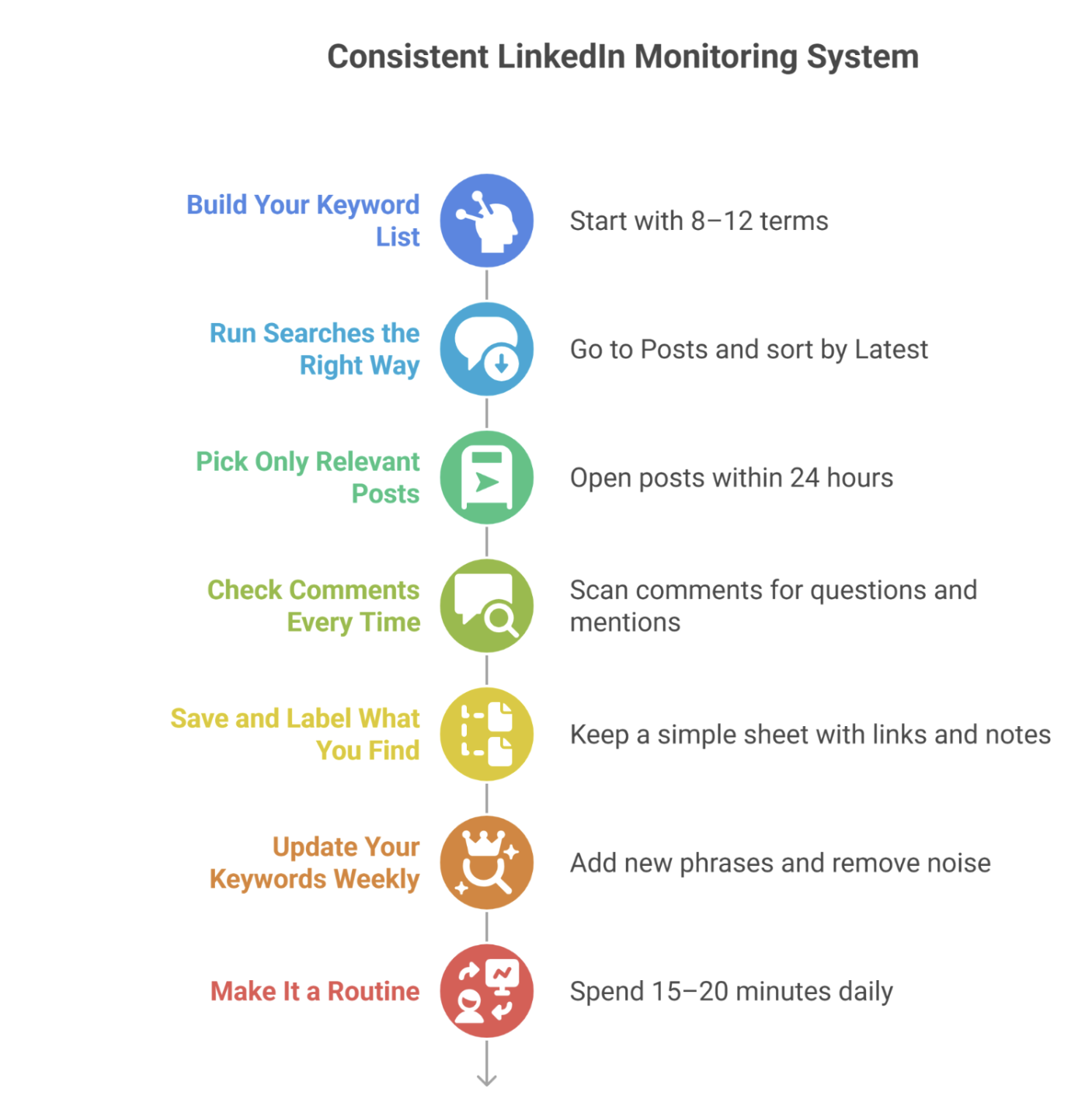
Step 1 - Build Your Keyword List#
Start with 8–12 terms:
your brand name (and variations)
category phrases (e.g., “cold email tool”)
problem phrases (e.g., “emails going to spam”)
2–3 competitor names
Step 2 - Run Searches the Right Way#
For each term on LinkedIn:
Go to Posts
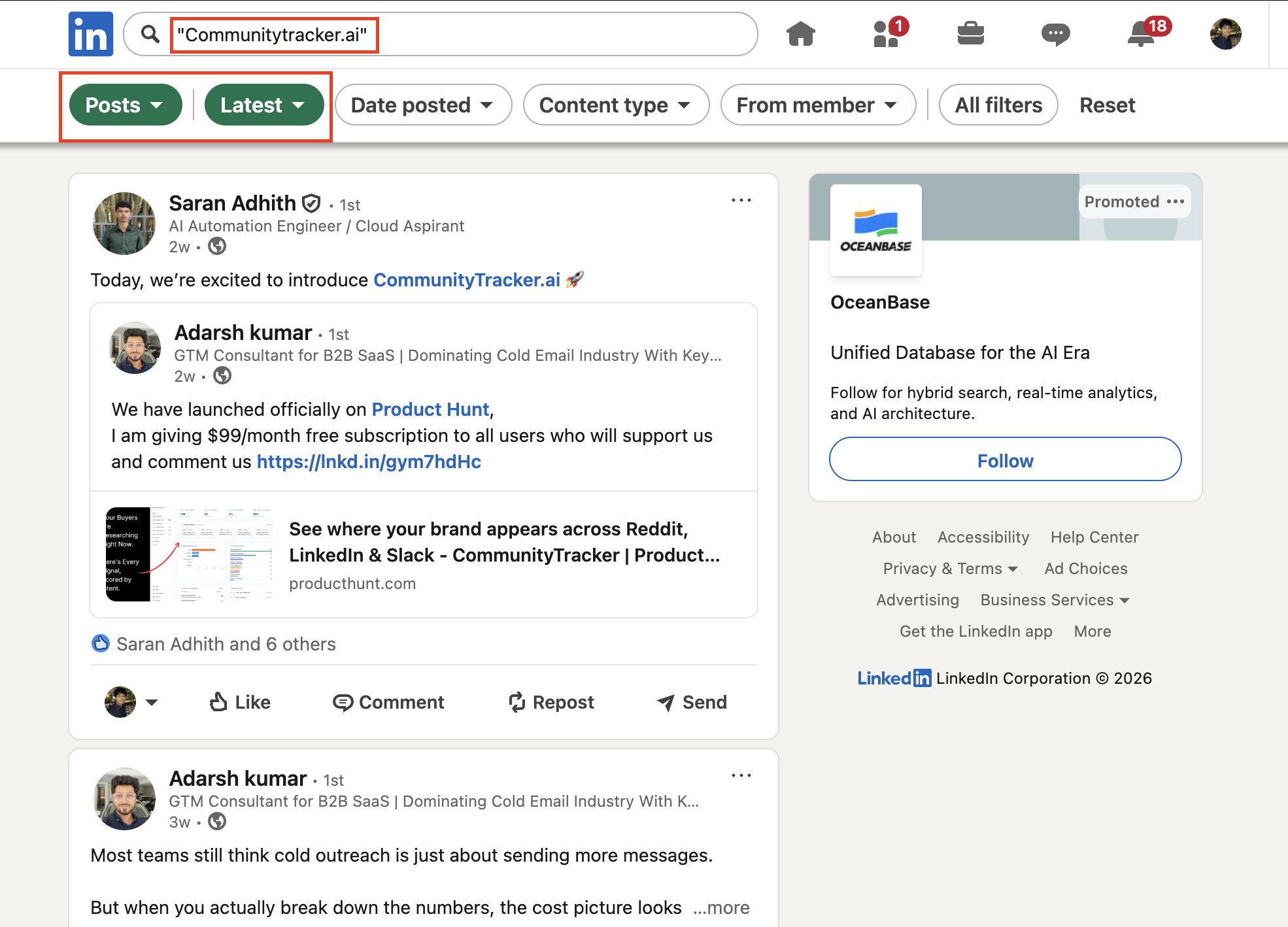
Sort by Latest
This gives you current conversations, not old or crowded ones.
If you’re tracking multiple keywords, tools like Community Tracker can help you avoid running these searches manually every time.
Step 3 - Pick Only Relevant Posts#
Don’t read everything. Open posts that are:
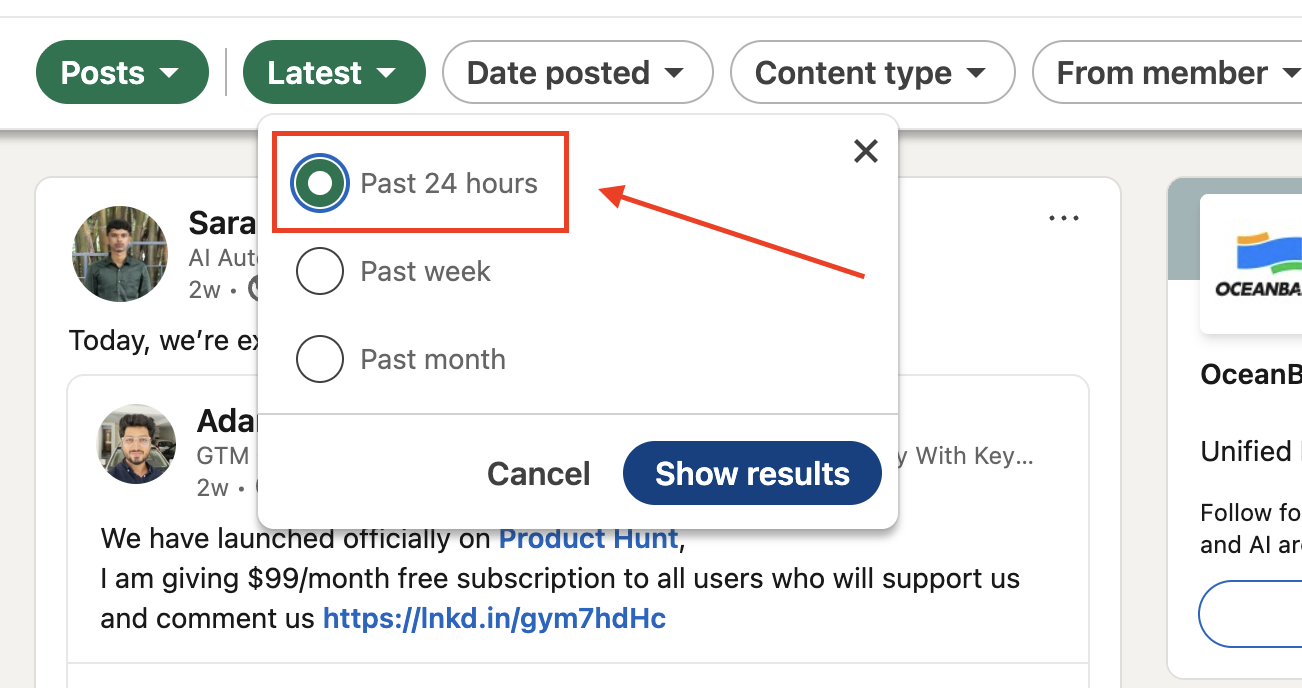
Recent (ideally within 24 hours)
Clearly about a problem, tool, or comparison
Step 4 - Check Comments Every Time#
After opening a post, scan comments for:
Questions (“any suggestions?”)
Tool mentions
Follow-ups
A lot of useful signals appear here.
Step 5 - Save and Label What You Find#
Keep a simple sheet:
Link
Keyword
Type (brand / problem / competitor)
Short note (what’s happening)
This helps you track patterns over time. You can also use tools like Community Tracker to keep all conversations organized in one place instead of managing them manually.
Step 6 - Update Your Keywords Weekly#
Add new phrases you see people use. Remove ones that bring noise. This improves your coverage over time.
Step 7 - Make It a Routine#
Spend 15–20 minutes daily:
Run your keywords
Review new posts
Save relevant ones
If you follow this system, your monitoring becomes more accurate.
You start finding better conversations, more relevant mentions, and clearer signals, so you’re not wasting time on random or low-quality posts.
Common LinkedIn Monitoring Mistakes to Avoid#
Even with a system, a few mistakes can make your monitoring ineffective. Most of these come from tracking the wrong things or doing it inconsistently.
Tracking only your brand name This limits your visibility. Most conversations happen around keywords and problems, not direct mentions.
Using broad keywords Terms like “marketing” or “sales” bring too much noise. You need specific phrases to find relevant discussions.
Ignoring comments A lot of useful signals appear in comments. Skipping them means missing active discussions.
Checking inconsistently Monitoring once in a while won’t work. Gaps in tracking lead to missed conversations.
Not updating keywords If you keep using the same keywords, your coverage stays limited. You need to refine them based on what you find.
Avoiding these mistakes keeps your LinkedIn monitoring focused and improves the quality of what you track.
Pro Tips to Improve Your LinkedIn Monitoring#
Once your system is running, these small changes will improve the quality of what you find.
1. Use a Simple Scoring Rule#
Don’t open every post. Prioritize ones that are:
posted recently (same day)
clearly mention a problem or tool
have low comments (less competition)
This helps you focus only on useful conversations.
3. Track Posts in One Place#
Don’t rely on memory. Save posts with:
link
keyword used
type (brand / problem / competitor)
short note (what the post is about)
After a few days, you’ll start seeing repeated patterns.
4. Search Like Your Users#
Instead of only using keywords like “cold email tool,” also search:
“any tool for cold email?”
“how are you doing outreach?”
This brings more real conversations.
5. Refine Keywords Based on Results#
If a keyword gives poor results, replace it. If you see new phrases in posts, add them.
6. Focus on Repeat Signals#
If the same problem or discussion shows up multiple times, it’s worth tracking closely. One post is random, repeated posts show real demand.
These tips help you move from basic monitoring to finding better, more relevant opportunities.
Limitations of Manual LinkedIn Monitoring#
These are the typical limitations I’ve noticed most people face into when monitoring LinkedIn manually.
No real-time visibility: You only see posts when you search. Any conversations that happen in between are missed, especially short-lived ones.
Limited keyword coverage: You can track only a few keywords at a time. Expanding beyond that quickly becomes time-consuming.
Comments are easy to miss: Important discussions often happen in comments, but you won’t catch them unless you open every post manually.
Search results are incomplete: LinkedIn doesn’t show all posts for a keyword. You only see a portion, which means missed mentions.
Time-dependent results: What you see depends on when you search. The same keyword can give completely different results at different times.
No tracking history: You can’t easily track what you’ve already seen. This leads to repeated work or missed follow-ups.
Hard to scale: As your keyword list grows, manual monitoring becomes difficult to maintain consistently.
At this stage, manual monitoring gives you partial visibility. You search, find a few posts, and miss the rest. As your keywords grow, it becomes hard to keep track consistently.
Community Tracker fixes this by automating the entire monitoring process.
Also Read: 10 Best LinkedIn Post Scraper Tools for Social Listening and Outreach in 2026
Monitor Using a Linkedin Monitoring Tool#
Community Tracker.ai is a community intelligence platform that tracks LinkedIn (and other communities) for brand mentions, keywords, competitor discussions, and problem-based conversations.
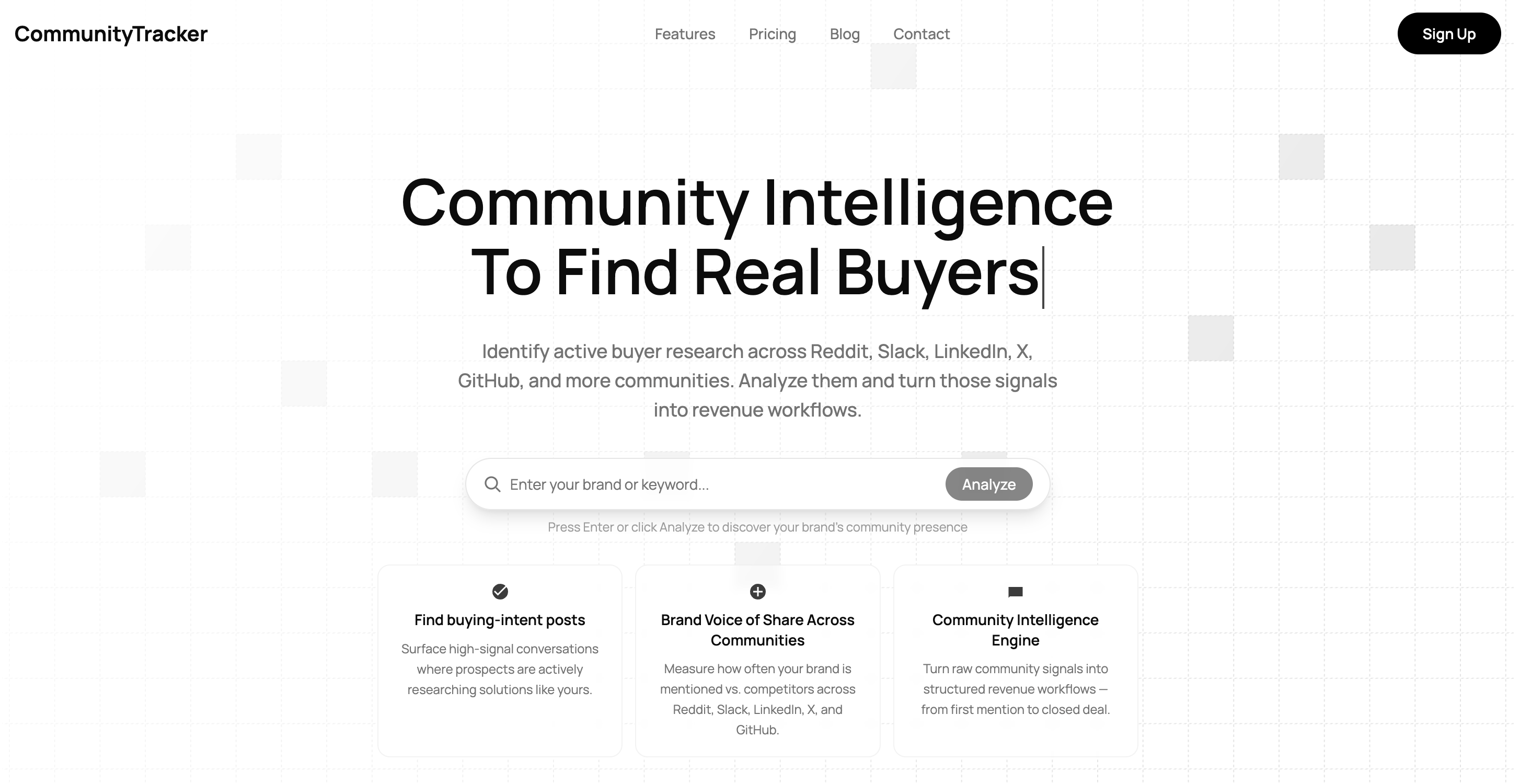
It identifies high-intent signals like recommendation requests, comparisons, and real problems, and brings them into one place so you can act on them.
Once you set it up, the process becomes much more structured and consistent.
Continuous Tracking Instead of Manual Search#
It tracks conversations in the background. Instead of running searches daily, you get a steady stream of:
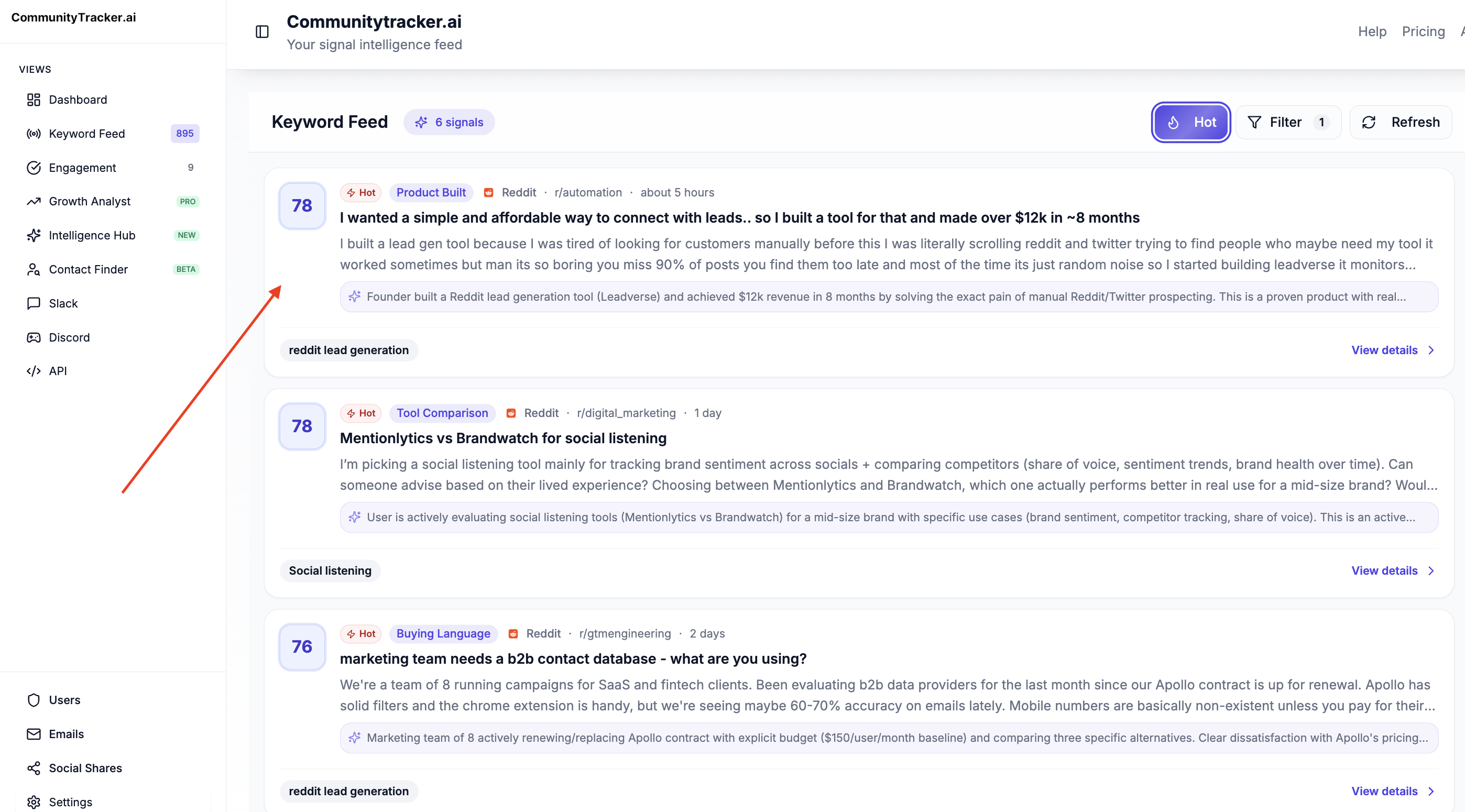
Brand mentions
Keyword discussions
Competitor conversations
Problem-based posts
All in one place.
Focus on High-Intent Conversations#
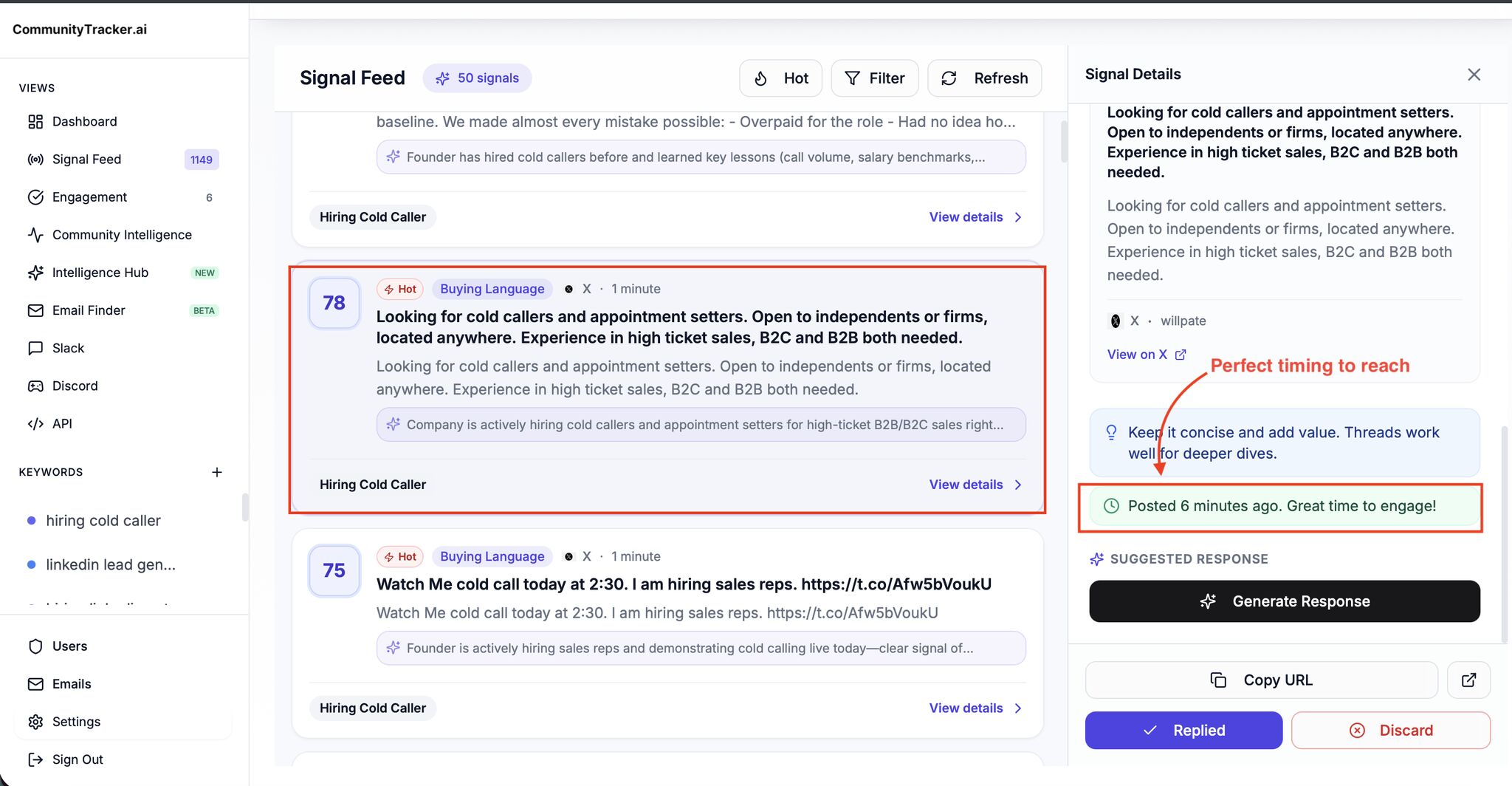
Not every post matters. Community Tracker filters out noise and highlights conversations where people are:
Asking for tools
Comparing options
Discussing real problems
So you spend time only on relevant signals.
Full Visibility (Posts + Comments + History)#
It captures complete conversations, including comments, and keeps a history. This means:
You don’t miss discussions
You don’t repeat work
You can track patterns over time
Clear Context, Not Just Alerts#
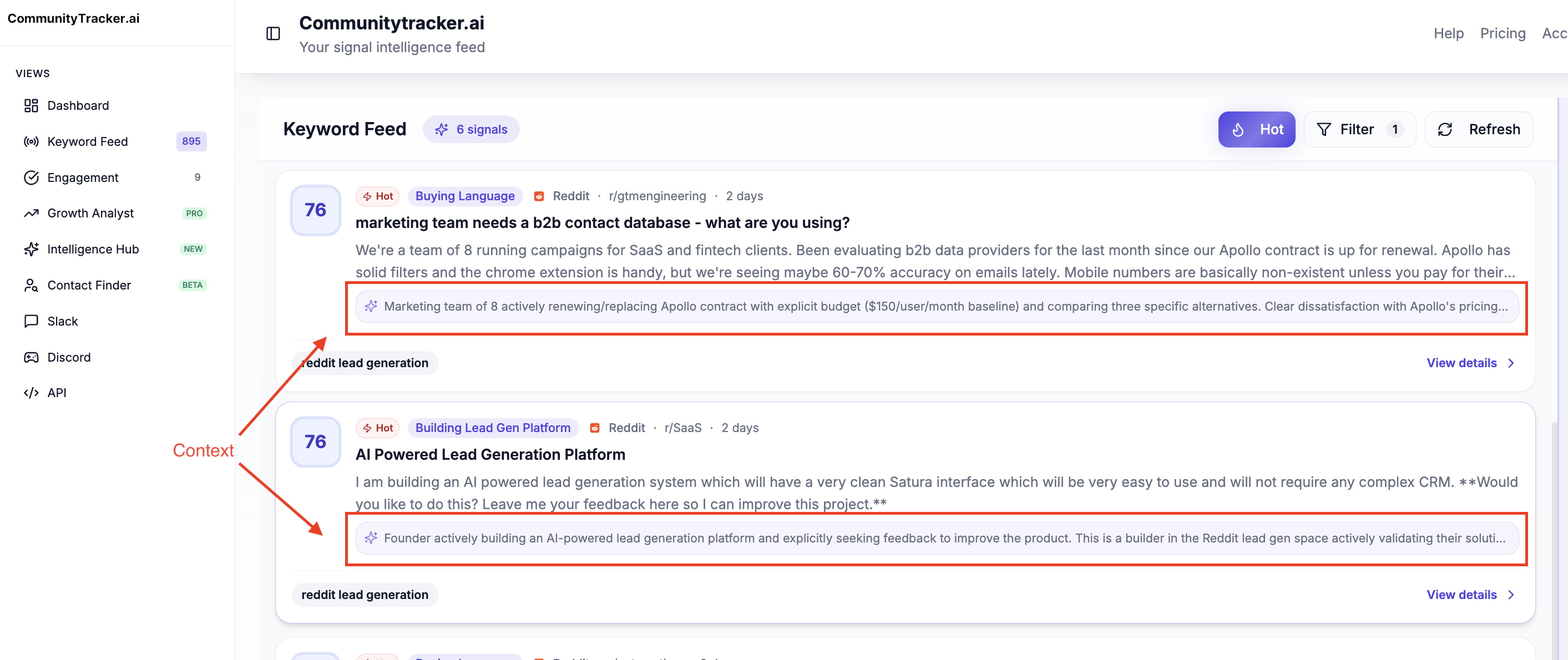
Instead of just showing posts, it adds context, what the conversation is about and why it matters, so you can quickly decide what to focus on.
Simple Pricing#
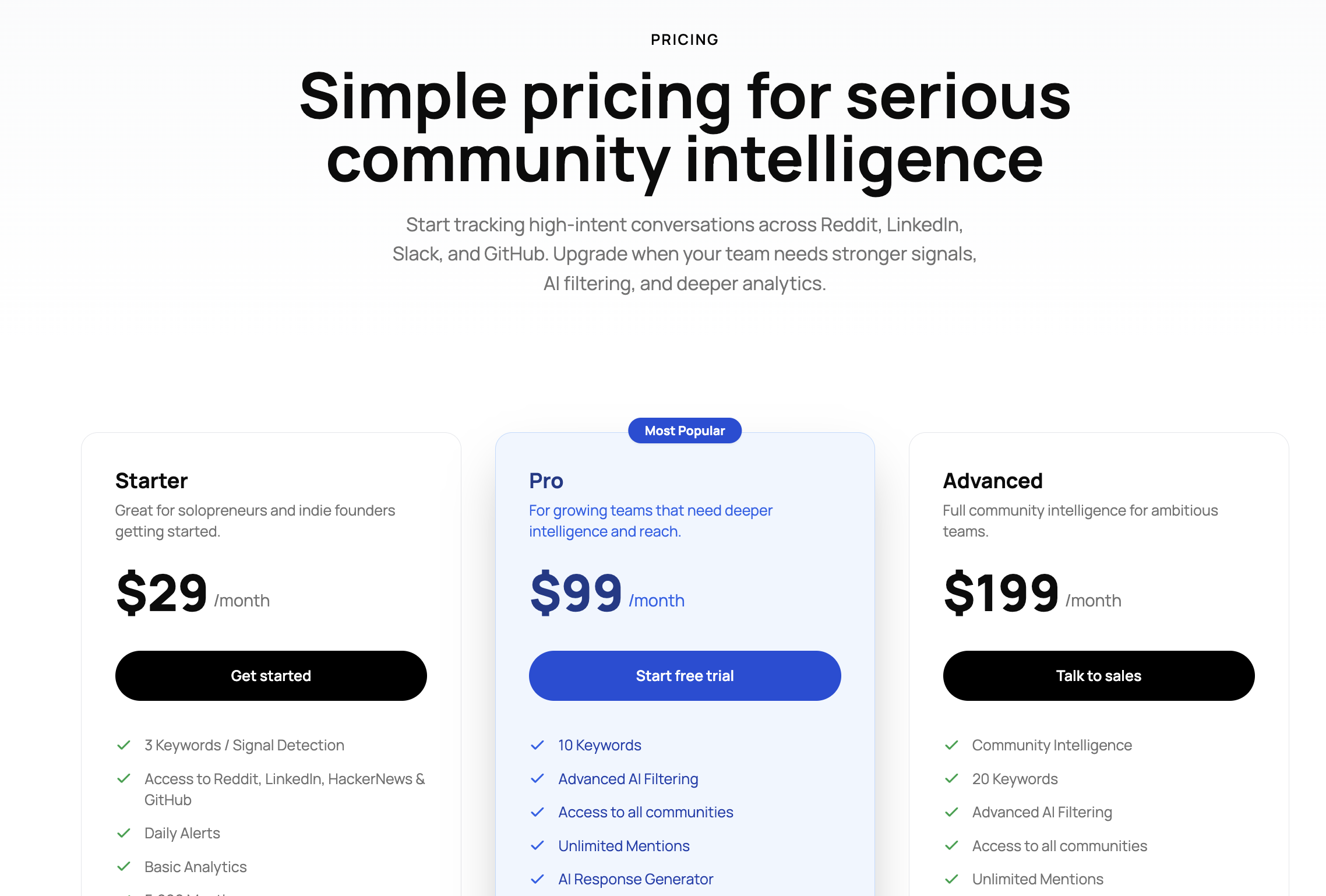
Starter - $29/month Covers 3 keywords, tracks LinkedIn and a few other platforms, includes daily alerts, basic analytics, and up to 5,000 mentions.
Pro - $99/month Covers 10 keywords, includes advanced AI filtering, access to all supported communities, unlimited mentions, daily Slack alerts, and features like AI scoring and share of voice.
Advanced - $199/month Covers 20 keywords, includes full community intelligence, advanced filtering, unlimited mentions, share of voice tracking, AI visibility, and deeper insights.
Community Tracker replaces manual effort with a consistent system.
You don’t have to keep searching, you get the right conversations surfaced automatically, so you can focus on identifying and acting on real opportunities.
Related Reads: 11 Best Twitter Monitoring Tools I Tested to Track Mentions in 2026
Conclusion#
Monitoring LinkedIn works when it’s consistent and structured. Once you move beyond random searches, you start seeing real signals, mentions, problems, and conversations that actually matter.
The challenge is maintaining that consistency.
Manual tracking can get you started, but it becomes harder to manage as your keywords and coverage grow.
At that point, using something like Community Tracker helps you automatically track and organize relevant LinkedIn conversations, so you don’t have to rely on manual searching.
Use Community Tracker to automate your LinkedIn monitoring and focus on finding real opportunities.
FAQs#
How do you monitor LinkedIn for brand mentions?#
Search your brand name using the Posts → Latest filter and track both tagged and untagged mentions. For consistent tracking, include keyword-based searches along with your brand name.
How do you find business opportunities on LinkedIn?#
Track category keywords, problem discussions, and posts where people ask for tools or recommendations. These usually indicate active demand.
How often should you monitor LinkedIn?#
Daily monitoring works best. Even 15–20 minutes a day is enough if you follow a clear process.
What keywords should you track?#
Start with:
your brand name
product/category keywords
common problem phrases
competitor names
Then refine based on results.
Why is LinkedIn monitoring difficult manually?#
Because conversations are spread across posts and comments, results change over time, and you can’t track everything consistently.
Can LinkedIn monitoring be automated?#
Yes. Tools like Community Tracker automate tracking, surface relevant conversations, and reduce manual effort.
What is the biggest mistake in LinkedIn monitoring?#
Tracking only your brand name. Most useful conversations happen around problems and keywords, not direct mentions.